Microsoft is driving me crazy with these “forced” features they have been including with windows. An example of this is Window’s Anti-Malware. It runs in the background scanning everything you do. This can be good for an average users, but for someone that wants to transfer 12 TB from a USB device to a Network share, it well, slows it down.
Here is a screenshot example of it eating up valuable network speed:

We just disable the bloody thing.
Here’s how you do it:
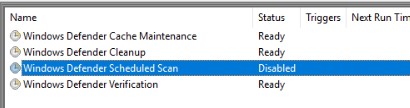
First we disable the scheduled scan.
Start -> Search -> Task Scheduler -> Library -> Microsoft -> Windows -> Windows Defender -> Scheduled Scan -> Right Click Disable
Then we disable the active scan by stopping it from starting in the first place.
Start -> Search -> regedit
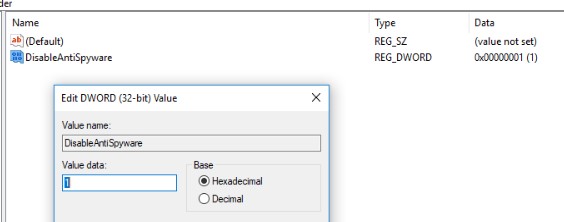
Computer\HKEY_LOCAL_MACHINE\SOFTWARE\Policies\Microsoft\Windows Defender
Create DWORD = DisableAntiSpyware
Value = 1
Thanks it, your done!